Wednesday, October 19, 2011

Source Control: Using TFS 2010 with BIDS 2008 (or) Adding your BIDS Solution to TFS 2010

Steps:
  •     Install Visual Studio 2008 Team Explorer.
  •     Install Visual Studio 2008 SP1. Download it from here.  (VS90sp1-KB945140-ENU.exe)

Screen Shots - Installing Visual Studio Service Pack 1: 
  • Extraction of files

Products dependent on this update

Accept Terms

Installation Progress
  •       Install “Visual Studio Team System 2008 SP1 Forward Compatibility Update for Team Foundation Server 2010”.  Download it from here. (VS90SP1-KB974558-x86.exe)

VS 2008 Forward Compatibility update

Accept terms for Forward Compatibility

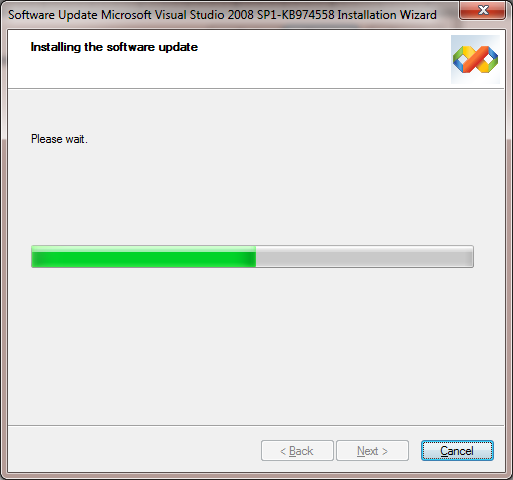
Installation of Forward compatibility update

Successful completion of forward compatibility update
EnJoY!!!!...
CoOoOlLlL.....

Monday, April 4, 2011

Data Driven Subscriptions and Row-level Security

Scenario: A customer wants to have report row-level security and data-driven subscriptions. If you have used SSRS for a while, you will now the cornerstone of report row-level security is User!UserID which returns the user identity. But here is the catch – SSRS will refuse creating a data driven subscription if a report has an expression with User!UserID.


Solution: How do we solve this horrible issue? A great hack is in order. We will disguise the User!UserID in an embedded function inside the report or in an external assembly so SSRS can't see it. (The reason why this function is named GetHashedUser although no hashing is in place will become obvious in a moment)


Public Function GetHashedUser() as String
   return Report.User!UserID.ToLower()
End Function

Believe it or not, this lets the data-driven subscription going. But there is another catch. A data-driven subscription runs in unattended mode and you need to pass the user identity as a parameter. So, when the report is executed live we want to pass the internal User!UserID to the report query or stored procedure. But when the report is subscribed to, we want to pass the user identity as a parameter. A simple expression for the query parameter will do the trick.

=iif(Parameters!UserID.Value ="", Code.GetHashedUser(), Parameters!UserID.Value)


If the parameter is empty (live delivery), we will call the GetHashedUser function, otherwise, we will pass the parameter value to the database. So far so good, but we now have a security hole. There is nothing stopping the end user from spoofing the report parameter and passing another user's identity to it to force the report take the data-driven subscription path. To fix this, we will need some level of encryption. It is suggested a solution that encrypts the user identity with SHA1 hash both in the report and the database. This should keep spoofy users at bay.

Note: The above solution assumes a report connection string with stored credentials which is what you would typically have for T-SQL (relational) reports. What about SSAS with Windows and dimension security? Not a good story and no changes in Denali.

Original Post by: Teo Lachev (Link)

EnJoY!!!!...
CoOoOlLlL.....

Tuesday, October 5, 2010

SQL Facts: Indexes Limit Increased in SQL 2008
The limit of nonclustered indexes are increased from 249 to 999 in SQL Server 2008

Tuesday, September 21, 2010


SQL Administration: Dynamic Management Views

Introduction

The DMVs; newly introduced in SQL Server 2005 gives the database administrator information about the current state of the SQL Server machine. These values will help the administrator to diagnose problems and tune the server for optimal performance. DMVs are designed to be used instead of system tables and various other functions provided in SQL Server 2000. Here, we will see only about the frequently used DMVs.
Two types of dynamic management views:
a)   Server-scoped DMV: Stored in Master Database
b)   Database-scoped DMV: Specific to each database

Permission to Execute DMV [Security]

To query a server scoped DMV, the database user must have SELECT privilege on VIEW SERVER STATE and for database scoped DMV, the user must have SELECT privilege on VIEW DATABASE STATE.
  • GRANT VIEW SERVER STATE to
  • GRANT VIEW DATABASE STATE to
If you want to deny a user permission to query certain DMVs, you can use the DENY command to restrict access to a specific DMV.

Getting Started

All the DMVs exits in SYS schema and their names start with DM_. So when you need to query a DMV, you should prefix the view name with SYS. As an example, if you need to see the total physical memory of the SQL Server machine; then execute the below TSQL command:
SELECT 
(Physical_memory_in_bytes/1024.0)/1024.0 AS Physical_memory_in_Mb 
FROM 
sys.dm_os_sys_info
In this article, I will be explaining some of the DMVs which can be used frequently to understand the current behavior of SQL Server:
  1. SQL Server related [Hardware Resources] DMV
  2. Database related DMV
  3. Index related DMV
  4. Execution related DMV

1.   SQL Server Related DMV

This section details the DMVs associated with SQL Server system. SQL DMV is responsible to manage server level resources specific to a SQL Server instance.
This section covers DMVs related to OS, Disk and Memory.

a)   sys.dm_os_sys_info

b)   sys.dm_os_hosts

c)   sys.dm_os_schedulers

d)   sys.dm_io_pending_io_requests

e)   sys.dm_io_virtual_file_stats

f)    sys.dm_os_memory_clerks

g)   sys.dm_os_ring_buffers

a)   sys.dm_os_sys_info

This view returns the information about the SQL Server machine, available resources and the resource consumption.
This view returns information like the following:
  1. CPU Count: Number of logical CPUs in the server
  2. Hyperthread-ratio: Ratio of logical and physical CPUs
  3. Physical_memory_in_bytes: Amount of physical memory available
  4. Virtual_memory_in_bytes: Amount of virtual memory available
  5. Bpool_commited: Committed physical memory in buffer pool
  6. OS_Priority_class: Priority class for SQL Server process
  7. Max_workers_thread: Maximum number of workers which can be created

b)   sys.dm_os_hosts

This view returns all the hosts registered with SQL Server 2005. This view also provides the resources used by each host.
  1. Name: Name of the host registered
  2. Type: Type of hosted component [SQL Native Interface/OLE DB/MSDART]
  3. Active_tasks_count: Number active tasks host placed
  4. Active_ios_count: I/O requests from host waiting

c)   sys.dm_os_schedulers


SQL Administration: Database and Execution Related DMVs:

sys.database_permissions: Contains information about all the permissions held by users and roles

sys.database_permissions: Contains information about all the permissions held by users and roles

sys.columns: Contains data about each column of an object that has columns, such as views or tables

sys.database_principals: Contains information about all database users and database roles

sys.index_columns: -- Index columns

List of Execution DMVs:


References: MSDN

EnJoY!!!!...
CoOoOlLlL.....

Friday, August 27, 2010


SQL Programming: Calling the web service with parameterized query string (using OLE automation)

 
Say, we have a webservice which sends SMS, which should be called by passing the needed parameters thru SQL query. 

 
We can get use of OLE Automation Stored Procedures within SQL Server.
List of Stored Procedure we can use to achieve this:
sp_OACreate - Creates an instance of an OLE object

sp_OAMethod
- Calls a method of an OLE object.

sp_OADestroy
- Destroys a created OLE object

sp_OASetProperty
- Sets a property of an OLE object to a new value

sp_OAGetProperty
- Gets a property value of an OLE object.

sp_OAStop
- Stops the server-wide OLE Automation stored procedure execution environment


These stored procedures were disabled by default, and should be initiated manually from surface area configuration tool (Refer MSDN).administrator privileges were required to execute this stored procedures

 
In SQL 2008,there is no surface area configuration tool. It is integrated within the Facets option.(refer mssqltips)

 
Set these options to True for better execution.
  • ClrIntegrationEnabled
  • OleAutomationEnabled
  • XPCmdShellEnabled


Sample Stored Procedure Query:


declare @sUrl varchar(4000),@param1 varchar(100),@param2 varchar(100),
@obj int,@response varchar(800),@MobileNo varchar(50),@MovieName varchar(50), @SmsId int


select @RowCount =
count(*)
from tbl_SMSAlertMovie where status is null

while (@RowCount > 0)
begin
select
top 1 @SmsId =SmsId, MobileNo=MobileNo,@MovieName=MovieName from tbl_SMSAlertMovie where status is null

 
set @sUrl =
'http://192.168.17.17:8080/webservice.aspx?'
set @param1='&MobileNo='+@MobileNo
set @param2='&Movie='+@MovieName
set @sUrl= @sUrl+@param1+@param2
    exec
sp_OACreate
'WinHttp.WinHttpRequest.5.1', @obj OUT
    exec
sp_OAMethod
@obj,
'Open',
NULL,
'GET', @sUrl, false
    exec
sp_OAMethod
@obj,
'send'
    exec
sp_OAGetProperty
@obj,
'responseText', @response OUT
    exec
sp_OADestroy
@obj
--    select @response [response] à use if you need to store result

 
update dbo.tbl_ SMSAlertMovie
set Status='Y' where SmsId=@SmsId

 
select @RowCount =
count(*)from tbl_SMSAlertMovie where status is null
end


EnJoY!!!!...

CoOoOlLlL.....

Monday, October 20, 2008

Displaying Report Generated User at the Report Footer only with User Name

Displaying Report Generating user name without Domian or System name:

Hope we guys know the usual way to display Report Generating User, using the Expression:

="Report Generated by : " & User!UserID

which will display as:

Eg.  Report Generated by : MSSOL\ssrsuser1 

where,

MSSOL is Domain/System Name

ssrsuser1 is Domain User

if we want to display only the User Name excluding Domain name/ System name

The following Expression would really helps:

="Report Generated by : " & User!UserID.Substring(User!UserID.LastIndexOf("\")+1)

which will display as:

Eg. Report Generated by : ssrsuser1

Thats it... no system name/Domain name.. only UserName 

SSRS Expression.... Always Rocks!!!!!...

EnJoY!!!!...

CoOoOlLlL.....
Friday, October 17, 2008

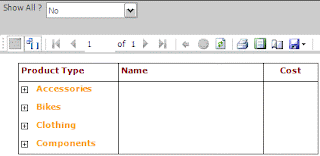
Expand Collapse all columns in SSRS reports by one single option

To expand and collapse all columns in your report by selecting a single option:

here by selecting a value to a parameter 

1. create one Report parameter

 parameter name: showall

which has non-queried values as follows:
label             values
~~~              ~~~~~
Yes               Expanded
No                Collapsed

 Initial value is: 
Non-Queried : Expanded

2. set visibility property of the row select and write:

=iif(Parameters!ShowAll.Label ="No",true,false) 
                    or
=iif(Parameters!ShowAll.Value = "Collapsed", True, False)  

set toggleItem to a textbox (eg: textbox1)

3. set (textbox1) InitialToggleItem property select and write:

=iif(Parameters!ShowAll.Label ="Yes",true,false) 
             or
=iif(Parameters!ShowAll.Value ="Expanded",true,false)  

RESULT:

----------------------------

ShowAll? Yes

----------------------------

ShowAll? No

  Rocks!!!!
now u can make all the report data to expand and collapse in single option...

also refer to my post in msdn forum.

http://social.msdn.microsoft.com/forums/en-US/sqlreportingservices/thread/cba00cd6-7c39-4233-a06b-b00ff1dd7672/

EnJoY!!!!...

CoOoOlLlL.....