Showing posts with label expand and collapsing all columns. Show all posts

Friday, October 17, 2008

Expand Collapse all columns in SSRS reports by one single option

To expand and collapse all columns in your report by selecting a single option:

here by selecting a value to a parameter 

1. create one Report parameter

 parameter name: showall

which has non-queried values as follows:
label             values
~~~              ~~~~~
Yes               Expanded
No                Collapsed

 Initial value is: 
Non-Queried : Expanded

2. set visibility property of the row select and write:

=iif(Parameters!ShowAll.Label ="No",true,false) 
                    or
=iif(Parameters!ShowAll.Value = "Collapsed", True, False)  

set toggleItem to a textbox (eg: textbox1)

3. set (textbox1) InitialToggleItem property select and write:

=iif(Parameters!ShowAll.Label ="Yes",true,false) 
             or
=iif(Parameters!ShowAll.Value ="Expanded",true,false)  

RESULT:

----------------------------

ShowAll? Yes

----------------------------
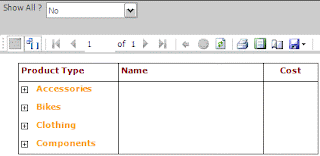
ShowAll? No

  Rocks!!!!
now u can make all the report data to expand and collapse in single option...

also refer to my post in msdn forum.

http://social.msdn.microsoft.com/forums/en-US/sqlreportingservices/thread/cba00cd6-7c39-4233-a06b-b00ff1dd7672/

EnJoY!!!!...

CoOoOlLlL.....